

The phrase “”hybrid event”” used to be a polite way of saying “”some people could not make it in person.”” That framing no longer holds. Today, hybrid conferences are a deliberate strategic choice — a format that extends reach, reduces travel costs for distributed teams, and creates content assets that live beyond the event day itself.
But running a hybrid conference well is significantly harder than running a purely in-person event. The technology layer is more complex, the production demands are higher, and the risk of creating a two-tier experience — excellent for the room, mediocre for the screen — is real and common.
At Encore Events Global, we have produced hybrid conferences ranging from 200-person town halls to 2,000-delegate national summits with simultaneous virtual audiences across multiple time zones. This is what actually works.
What Makes a Conference Truly Hybrid
A hybrid conference is not simply a live-streamed event. The distinction matters enormously in production terms. A live stream broadcasts what is happening in the room to passive viewers. A hybrid conference treats in-person and remote participants as co-equal audiences, each with a designed experience, each able to engage with the content and, where relevant, with each other.
The difference shows up in concrete production decisions: whether remote attendees can ask questions in real time, whether breakout sessions have virtual equivalents, whether the camera work is optimised for a screen viewer rather than just documenting the room, and whether the content pacing accounts for the attention patterns of someone watching on a laptop versus sitting in a ballroom.
Getting this distinction right at the brief stage is the single most important step in hybrid conference planning.
The Core Technology Stack
The technology required for a well-executed hybrid conference spans several interconnected layers. Each one needs to be specified, tested, and backed up before the event day.
| Layer | Components | Key Consideration |
|---|---|---|
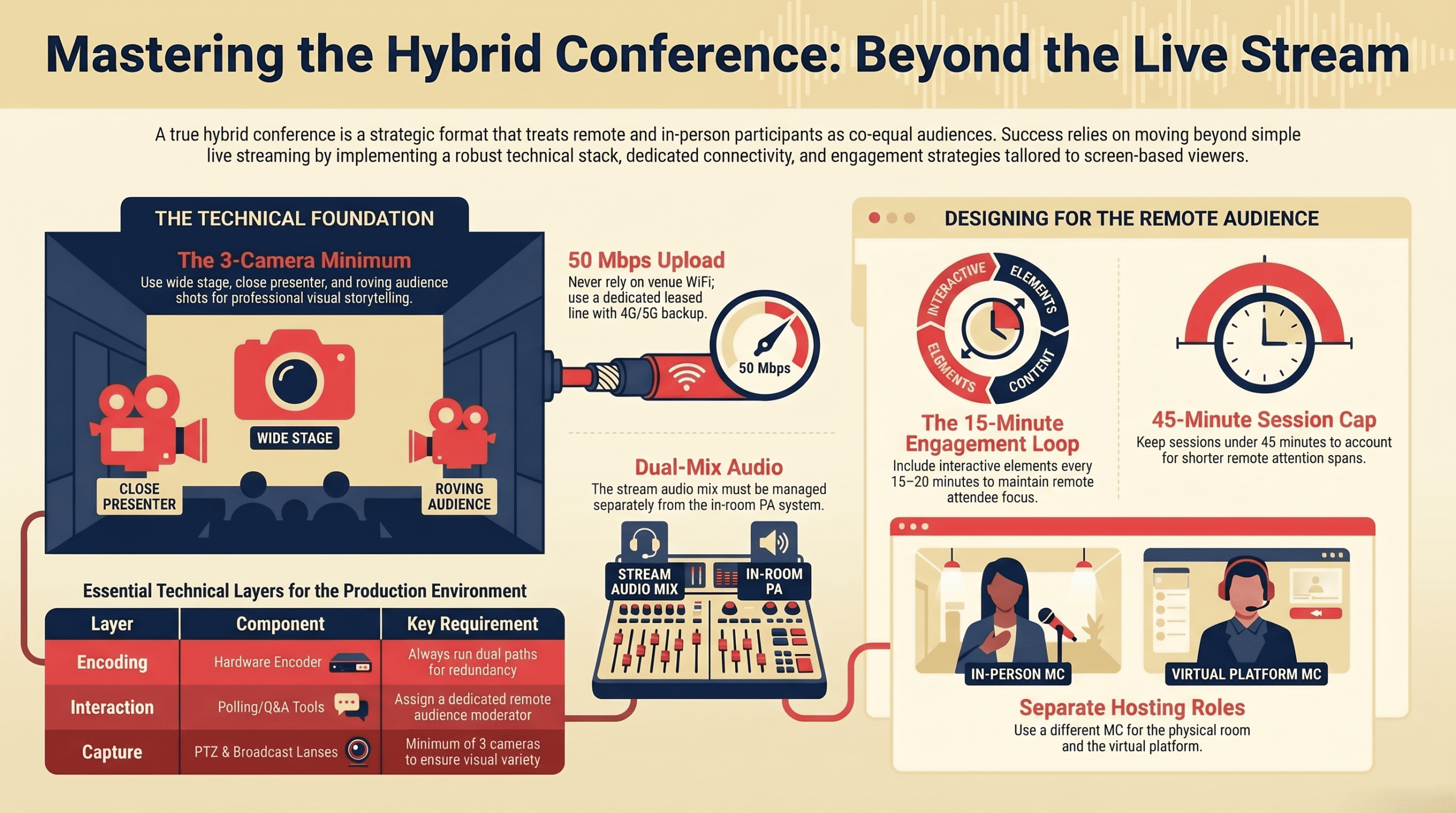
| Capture | Professional cameras, broadcast lenses, PTZ cameras for audience shots | Minimum 3-camera setup for meaningful visual storytelling |
| Switching | Live vision mixer, replay server, graphics engine | Dedicated vision switcher operator — not the same person running slides |
| Encoding | Hardware encoder, streaming PC, redundant encode path | Always run dual encode paths — one failure point is one too many |
| Platform | Streaming platform (YouTube Live, Vimeo, proprietary), virtual event platform | Match platform to audience size and interactivity requirements |
| Interaction | Live Q&A tools, polling software, chat moderation panel | Assign a dedicated remote audience moderator — this role is often forgotten |
| Audio | Broadcast-quality audio feed, dedicated stream mix, lavalier and handheld mics | The stream audio mix must be set separately from the room PA mix |
| Connectivity | Dedicated leased line, 4G/5G bonding backup, bandwidth monitoring | Never rely on venue WiFi for streaming — always bring a dedicated line |
Live Streaming Setup: What You Actually Need
The most common mistake in hybrid conference production is underspecifying the streaming setup. A single camera pointed at a stage and a laptop running OBS is not a hybrid conference — it is a recording. Here is what a professional streaming setup for a large corporate conference actually requires:
Camera Configuration
A minimum of three camera positions: a wide stage shot, a close presenter shot, and a roving camera for audience and panel reactions. For larger conferences with multiple speakers or panel sessions, add a dedicated camera per podium or panel seat. PTZ (pan-tilt-zoom) cameras are useful for static wide shots but should not replace manned cameras for close presenter coverage.
Dedicated Stream Audio Mix
This is the most frequently overlooked element. The room PA system is mixed for people sitting in a physical space. The stream audio needs its own mix — cleaner, with different EQ and compression settings — sent directly to the encoding system. Without this, remote viewers get an audio experience that sounds like a phone call from the back of a hall.
Graphic Overlays and Lower Thirds
Remote viewers need visual context that in-room audiences get from physical programmes and MC announcements. Speaker name lower thirds, session titles, company branding, and live poll results should all be integrated into the stream graphics layer — not an afterthought.
Redundancy at Every Point
Every single point in the streaming chain needs a backup. Dual encode paths, a 4G/5G bonded connection as backup to the primary leased line, a spare laptop pre-configured with streaming software, and a secondary camera on the main presenter position as a hot spare. Redundancy is not optional — it is what separates professional hybrid production from an expensive gamble.
Designing for the Remote Audience
Remote attendees at a hybrid conference are making a different kind of attention commitment than in-room delegates. They are sitting at a desk, surrounded by distractions, watching on a screen that is probably also open to their email. The content and production design must account for this.
- Session length: Remote attention drops sharply after 45 minutes without a break or interaction moment. Structure sessions accordingly, even if the in-room format would support longer runs.
- Interaction frequency: Build in a remote-specific interaction moment every 15-20 minutes — a poll, a Q&A prompt, a chat question. This re-engages attention and signals to remote participants that they are not just watching a recording.
- Dedicated moderator: Assign a team member whose sole job during the conference is managing the remote audience — monitoring chat, curating Q&A questions, and feeding remote participation into the in-room MC flow.
- Pre-event communication: Send remote attendees a clear technical guide — platform access, browser recommendations, system test links, and a contact number for technical support on the day.
- Post-event assets: Remote attendees should receive edited recordings, presentation decks, and any reference materials within 24-48 hours of the event. This is part of the experience design, not an administrative afterthought.
Protecting the In-Room Experience
A common failure mode in hybrid conferences is that the production team becomes so focused on the stream that the in-room experience suffers. Camera positions block sightlines. Lighting is set for cameras rather than for the room. The MC spends time managing remote Q&A instead of engaging the live audience.
Protecting the in-room experience requires a few deliberate design choices:
- Camera placement discipline: Camera positions must be agreed upon in the venue walkthrough with explicit attention to sightline impact for seated delegates. No camera should block a meaningful portion of the audience’s view of the stage.
- Lighting for both audiences: Stage lighting for a streamed event needs to be flatter and more consistent than purely theatrical event lighting. Work with the LD and the streaming team together during the technical rehearsal to find the balance.
- Separate MC roles: The in-room MC manages the physical audience and speaker flow. A separate virtual host manages remote participant engagement. These are two distinct jobs and should not be combined.
- Technology that does not intrude: Confidence monitors, teleprompters, and stage management systems should be invisible to in-room delegates. Cluttered stage technology breaks immersion for the live audience.
Internet Connectivity: The Non-Negotiable Foundation
Everything in a hybrid conference depends on internet connectivity. Every other technology decision is secondary to having a reliable, high-capacity, dedicated connection. This point cannot be overstated.
For large hybrid conferences, the connectivity requirements typically include:
- Dedicated leased line: A symmetric leased line of at least 50 Mbps upload for HD streaming, separate from the venue’s general internet infrastructure. Never share bandwidth with delegates or hotel guests.
- 4G/5G bonded backup: A bonded cellular connection using multiple SIM cards from different carriers, pre-configured to take over automatically if the primary line drops. This is the safety net that prevents a total stream failure.
- Bandwidth monitoring: Real-time bandwidth monitoring throughout the event day so the technical team has advance warning of any degradation before it affects the stream quality.
- Venue assessment: Always assess the venue’s existing infrastructure during the site inspection. Some premium venues have excellent connectivity; others — including many heritage properties and outdoor venues — require a full connectivity solution to be brought in.
At Encore Events Global, our Technical Director conducts a dedicated connectivity assessment at every hybrid event venue, including physical line testing and a full infrastructure review, well before the event day.
Content Strategy for Hybrid Formats
Content that works in a room does not automatically work on a screen. Hybrid conference content needs to be designed with both audiences in mind from the brief stage.
Presentation Design
Slides designed for a 10-metre wide screen in a ballroom often look terrible on a 13-inch laptop. Text is too small, charts are unreadable, and colour contrasts that work at distance look washed out on a screen. Provide speakers with hybrid-specific slide guidelines — minimum font sizes, colour palettes, and layout rules optimised for both screen sizes.
Session Formats
Fireside chats and panel discussions translate better to hybrid formats than lecture-style presentations, because the conversational dynamic is easier to follow on screen. Build these formats into the programme deliberately, particularly for sessions where remote audience engagement is a priority.
Breakout Sessions
Physical breakout sessions are one of the hardest elements to replicate in a hybrid format. Options include dedicated virtual breakout rooms running in parallel, asynchronous discussion boards, or hybrid panel structures where remote participants join a moderated discussion channel. The right solution depends on the session objective and the platform capabilities.
Common Mistakes and How to Avoid Them
- Relying on venue WiFi for streaming: Hotel and venue WiFi is shared infrastructure. It will not reliably support a broadcast-quality stream. Always bring a dedicated line.
- No technical rehearsal with remote participants: A full technical rehearsal must include a test with remote participants joining through the actual platform, on the actual connection, before the event day.
- Forgetting the stream delay: Live streams typically have a 15-30 second delay. Q&A management must account for this — otherwise remote questions arrive after the in-room discussion has moved on.
- One person running everything: Hybrid production requires separate operators for vision switching, stream monitoring, remote audience moderation, and in-room AV. Combining these roles creates single points of failure.
- No contingency plan: What happens if the stream drops? What if the primary camera fails? What if the platform goes down? Every hybrid conference needs a documented contingency plan that the whole production team knows before the event starts.
How Encore Events Global Produces Hybrid Conferences
At Encore Events Global, hybrid conference production is a distinct service offering with its own technical team, equipment inventory, and production methodology. We do not bolt streaming onto a standard conference setup and call it hybrid.
Every hybrid event is assigned a dedicated Technical Director who owns the streaming infrastructure alongside the in-room production. Our process includes a connectivity site assessment, a full technical specification document, speaker briefings on hybrid presentation design, a complete technical rehearsal with remote participant testing, and real-time stream monitoring throughout the event day.
We also provide post-event content deliverables — edited recordings, session highlight reels, and presentation archives — as a standard part of our hybrid conference package, because the content asset value of a well-produced hybrid event extends well beyond the event day itself.
Talk to our team about your next hybrid conference or large-format corporate event.
Frequently Asked Questions
What is the difference between a hybrid conference and a live-streamed event?
A live-streamed event broadcasts what happens in the room to passive viewers. A hybrid conference treats in-person and remote participants as co-equal audiences, each with a designed experience and the ability to interact with the content and, where relevant, with each other.
How much internet bandwidth is needed for a hybrid conference stream?
A minimum of 50 Mbps symmetric upload on a dedicated leased line is recommended for HD streaming at large conferences. This should be entirely separate from the venue’s general internet infrastructure, supplemented by a 4G/5G bonded backup connection.
How many cameras are needed for a professional hybrid conference?
A minimum of three camera positions — wide stage, close presenter, and roving audience — is required for meaningful visual storytelling. Larger conferences with multiple speakers or panel sessions require additional cameras per position.
What platforms work best for hybrid corporate conferences in India?
The right platform depends on audience size and interactivity requirements. YouTube Live and Vimeo work well for large audiences with one-way broadcast needs. Purpose-built virtual event platforms like Hopin, Airmeet, or proprietary enterprise solutions are better suited for conferences requiring breakout rooms, networking, and rich audience interaction.
How does Encore Events Global handle hybrid event production?
Encore assigns a dedicated Technical Director to every hybrid conference who owns both the in-room and streaming production. The process includes connectivity site assessment, full technical specification, speaker hybrid briefings, complete technical rehearsal with remote testing, and real-time stream monitoring throughout the event.
Conclusion
A well-executed hybrid conference is one of the most technically demanding event formats to produce — but it is also one of the most valuable. When done right, it extends your reach beyond the room, creates lasting content assets, and delivers a genuinely equal experience to every participant regardless of where they are sitting.
The gap between a hybrid conference that works and one that disappoints comes down almost entirely to the quality of the technical planning, the depth of the production team, and the discipline of the connectivity infrastructure. There are no shortcuts worth taking.
Connect with Encore Events Global to plan your next hybrid conference with a production team that has done this before.